pydocs-mcp
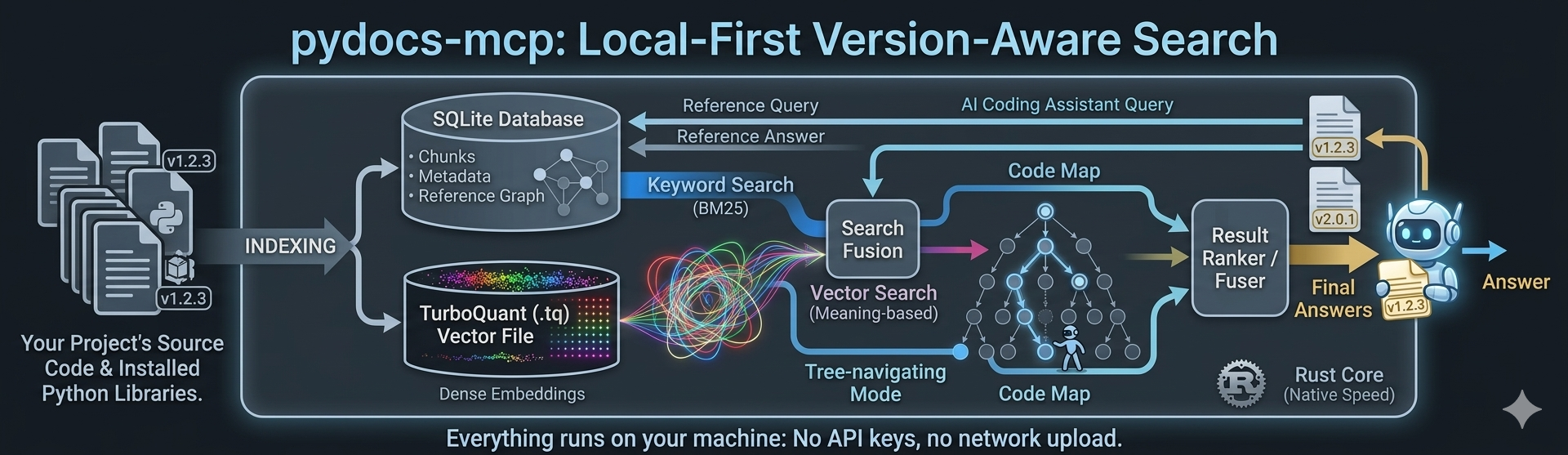
Local, version-aware code & docs search for your AI coding agent — over the exact library versions installed on your machine.
pydocs-mcp indexes your project plus every installed dependency, right on your machine, in seconds. Your agent connects over MCP and gets answers grounded in your code — no network calls in the default configuration. Network is used only if you opt into the OpenAI-compatible embedding provider, LLM decision structuring, or the LLM reasoning retrieval steps, each with your own key.
Prebuilt wheels for Linux, macOS, and Windows — no toolchain needed.
Index, search (keyword + meaning + reasoning), answer over MCP.
The public surface: exceptions, the MCP server, and application services.
Matched to your install. Searches the exact versions sitting in your
site-packages, so your agent stops inventing APIs from some older release.Private & offline. Everything runs locally — no API keys, no uploads, no rate limits, no per-query fees.
Three ways to find code. Keyword, meaning, and LLM reasoning (see How it works) — on their own or fused into one ranked answer.
Knows how your code connects. Ask “what calls this?”, “what does it call?”, or “what does this class inherit?” — across your project and every dependency.
Lean, not bloated. Minimal dependencies — no PyTorch, no FAISS. A small local ONNX embedder plus the Rust TurboQuant vector store (
turbovec), which packs embeddings ~16× smaller than float32 (a 1536-dim vector drops from 6,144 to 384 bytes; a 10M-doc corpus fits in ~4 GB instead of ~61 GB) and benchmarks faster than FAISS FastScan. The on-disk index stays tiny and search stays quick.Cheap to keep current. Edit a doc and only the changed chunks are re-embedded — partial re-ingestion, not a full rebuild — while unchanged packages are skipped in under 100 ms. A Rust core does the heavy lifting.
Three steps, all on your machine (see the diagram above):
Index — pydocs-mcp scans your project and installed deps into a local SQLite database (code chunks, metadata, and a graph of how everything references everything else) plus a compact TurboQuant
.tqvector file for meaning-based search. Re-running is cheap: unchanged packages are skipped, and when a file does change, only its changed chunks are re-embedded.Search — each query can use three complementary modes and fuse them into one ranked list:
Keyword — instant, exact matches for names, error strings, and signatures.
Meaning — dense embeddings find the right code even when your words differ from the docs’, via a small model that runs locally.
Reasoning — for broad or structural questions, an LLM walks your code’s map (titles + summaries, no embeddings) to pick the best spots.
Answer — results flow back to your agent through nine task-shaped tools:
search_codebase(find by relevance),get_symbol/get_context(jump to known names),get_references(trace callers, callees, inheritance, impact),get_overview(map what’s indexed),get_why(recorded design rationale), plus three filesystem tools —grep(exact-string / regex),glob(find files by name), andread_file(line-numbered reads) — that search the live source files the indexer sees, so exact-text lookups need no extra server. Every response is wrapped in a consistent envelope so the agent always knows where it stands — see Response conventions. The tool surface is frozen by contract (docs/tool-contracts.md), so MCP clients stay stable across server retunes.
Nothing ever leaves your machine unless you opt into a remote provider — the
reasoning mode or embedding.provider: openai — with your own key.
Response conventions
Every tool response — over MCP or the CLI — is wrapped in one shared envelope so the agent never has to guess whether an answer is stale, complete, or a dead end. Three conventions travel with every result:
Freshness header. A one-line stamp —
[index: 9bfd0c7 · 2d old · 214 packages]— tells the agent which commit the index was built from, how old it is, and how much it covers. If your working tree has moved past the indexed commit, a[⚠ index stale: … — run pydocs-mcp index .]warning is appended, so the agent knows to re-index instead of trusting drifted results.Next-step pointers. Results carry inline, runnable suggestions for the obvious follow-up call (jump to a symbol, widen the scope, trace a caller), resolved to whichever surface asked — an MCP tool call for clients, a CLI invocation on the terminal.
Truncation ledger. When a result is clipped to fit a token budget, a
[truncated: N sections — recovery pointers inline]footer lists exactly what was cut and the pointer that fetches each dropped piece in full — nothing goes missing silently.Routing suggestions. Dead ends carry a fixed
[suggestion: …]line with the escape hatch: a zero-hitgreppoints conceptual queries atsearch_codebase, a truncatedgrepshows how to narrow (path=/glob=/head_limit=), and zero-hit searches point back toget_overview. The prefix is deterministic, so transcripts always distinguish a server nudge from the agent’s own routing.
All four are on by default and tunable under output.envelope,
output.next_pointers, and output.suggestions.* in your pydocs-mcp.yaml.
The tool descriptions themselves — the prose your agent reads when it picks a
tool — ship in one editable document and can be swapped per deployment
(pydocs-mcp serve . --descriptions my-descriptions.md); every run logs a hash
of the description surface it actually served. See
docs/description-authoring.md for the format,
validation rules, and override precedence.